
Mastering AI Prompts: How to Get the Best Out of SQL Prompt AI
Most frustrations with AI tools stem from unclear prompts. This article uses realistic SQL examples to show how to get more predictable, useful results with SQL Prompt AI in day-to-day work, from writing reporting queries to improving the performance of existing SQL.
AI is powerful, but it’s not magic. What you get out of it depends on how clearly you describe the problem you’re trying to solve. The same applies when working with SQL Prompt AI. A prompt like “Make this SQL better” might work sometimes, but it leaves far too much open to interpretation. Better how? Faster execution? Clearer formatting? More readable logic? Or simply fixing a query that doesn’t run at all?
Good prompts remove this ambiguity. When you combine clear intent with SQL Prompt AI’s built-in understanding of your database schema, you help to constrain the problem the underlying model is trying to solve, right from the start. If you also spell out non-obvious table relationships, explain awkward naming conventions, or point out known data quirks, you dramatically reduce the dreaded circular back-and-forth and get the result you want faster.
This article focuses on practical ways to write clearer, more effective prompts for SQL Prompt AI. You’ll see how a small amount of extra detail can save a lot of time when working with LLMs against real-world databases.
What makes a good AI prompt?
You don’t need to understand large language models in depth to use them well, but a basic grasp of how to write a good prompt is useful. If you want to go deeper, there’s a short list of further reading at the end of this article.
If you’ve read any general guidance on writing effective prompts, you’ve probably come across frameworks like CRISPE, which break a prompt into elements like Context, Role, Instruction, Specification, Performance, Example. They are designed to help you structure prompts for open-ended AI tools, but the underlying idea is simple: the more clearly you define what you want, the less the model has to guess.
For example, I might start with a vague prompt such as:
“Write me an article about writing good AI prompts within Prompt AI.”.
That leaves the model to guess almost everything: who the audience is, what level of detail is appropriate, what tone to use, and what success looks like. A more effective prompt might look like this:
“You are writing for SQL developers who use SQL Prompt but haven’t tried its new AI features (Role). Write a 1500–2,000-word blog post that helps them improve the prompts they use with SQL Prompt AI (Instruction). Focus on real-world examples, such as writing a sales report query or improving the performance of an existing query (Context). In each case, include examples of weak vs. improved prompts and explain why the improved versions lead to more accurate results (Specification). A successful article will encourage users to try the AI features, helping them get useful results quickly rather than feeling frustrated by inconsistent results due to vague prompts (Performance). Here are two examples of my existing writing so you can match tone and style: [URL], [URL] (Example).”
This prompt defines the audience, the goal, the context, the structure, and what success looks like. It leaves the model far less to guess about and is likely to produce output that’s much closer to what you wanted.
And yes, you might now reasonably wonder whether this article was written by me, by an AI, or by a combination of both! I’ll leave you to decide.
What SQL Prompt AI needs from your prompt
With SQL Prompt AI, much of the structure that general prompt-writing frameworks talk about is already built in. Your role is implicit (you’re working in SQL), and parts of the specification, such as output format and SQL dialect, are constrained by the query window. Most importantly, a large part of the context comes directly from your database schema. SQL Prompt AI can inspect table names, column names, data types, and relationships without you needing to spell them out.
That built-in context is passed to the underlying model alongside your prompt, which removes much of the setup work you’d otherwise need. What remains, and where prompts most often fall short, is clearly defining the task: what you want to achieve.
As with any AI tool, vague prompts force SQL Prompt AI to guess your intent, and those guesses can be reasonable, but wrong. Clear prompts reduce that ambiguity. However, this also has a limit: SQL Prompt AI can only reason over what it can infer from your query and schema. If important relationships or business rules aren’t obvious from names and structure alone, you may still need to provide that context explicitly.
For almost any task you ask SQL Prompt AI to perform, one of the most effective ways to get the results you need faster is by giving it a concrete example to work from, such as a report query from another database or application that’s similar to what you require.
Make this SQL better!
This is a common style of prompt when you already have a working query and want to improve it. The problem is that “better” can mean very different things depending on the context.
Vague prompts yield variable results
Consider the prompt “Make this SQL better” applied to the following existing query on the AdventureWorks database:
|
1 2 3 4 5 6 7 |
SELECT p.ProductID , p.Name , th.Quantity , th.TransactionDate FROM Production.TransactionHistory AS th INNER JOIN Production.Product AS p ON p.ProductID = th.ProductID WHERE th.TransactionDate >= '13-05-2014' AND th.TransactionDate < '14-05-2014'; |
We’re relying on SQL Prompt AI to guess what better means. Should it fix errors? Improve performance? Make the query easier to maintain?
With this prompt, or by using the provided Fix SQL button, Prompt AI spots the obvious issue with the use of an English date format and rewrites the filter using an ANSI date format to avoid implicit conversions. With the vague prompt, it may also add a ORDER BY clause for a more predictable output. These are low-risk changes that don’t depend on knowing how the query is used.
However, what if we really meant by ‘better’ was “Make it run faster”? If we use that as a follow-up prompt, or try the Optimize SQL button, the results will likely be variable. SQL Prompt AI may suggest query recompilation, or various optimizer hints, or an index hint, none of which may address the real underlying performance issue.
Precise prompts give accurate, predictable results
When the problem is more clearly defined, SQL Prompt AI can provide guidance more targeted to the actual problem you’re experiencing. For example, paste in the same query provided above into SSMS, place your cursor after it, and try a prompt like this:
“Queries like the one above are executed frequently and often run slowly, performing excessive IO. Please suggest indexing and other possible query optimization strategies.”
Now, our goal is explicit. The prompt provides operational context (high frequency, poor performance), defines the task (indexing and query optimization), and implies a clear success criterion (reducing IO and latency).
At this point, the behavior becomes much more predictable. Now SQL Prompt AI knows what kind of problem you’re dealing with, we get a series of targeted recommendations, rather than generic tuning suggestions. For example, using its knowledge of the underlying schema, it suggests creating a covering index on TransactionDate to reduce IO due to lookups:
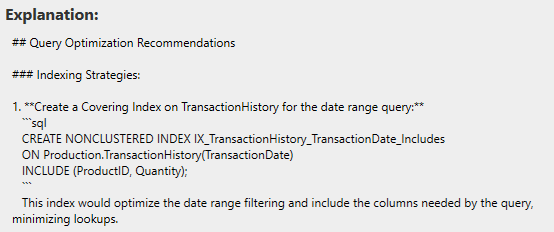
It also discusses other options, such as whether a filtered index might be appropriate, depending on the most common access patterns.
Show me the top customers
One of the most common prompts I see when people first try writing queries with a tool like SQL Prompt AI is a request to generate some form of sales report. Let’s see what happens when we ask “Show me the top customers” against a sales database.
This time, we’re asking SQL Prompt AI to generate a query from scratch. That means there’s no existing SQL to anchor its interpretation. On the AdventureWorks database, SQL Prompt AI produces the following query:
|
1 2 3 4 5 6 7 8 9 10 11 12 13 14 15 16 17 18 19 20 21 22 23 |
SELECT TOP (10) c.CustomerID, CASE WHEN v.FirstName IS NOT NULL THEN v.FirstName + ' ' + v.LastName WHEN s.Name IS NOT NULL THEN s.Name ELSE 'Unknown' END AS CustomerName, SUM(soh.TotalDue) AS TotalSpent FROM Sales.Customer c LEFT JOIN Sales.vIndividualCustomer v ON c.PersonID = v.BusinessEntityID LEFT JOIN Sales.Store s ON c.StoreID = s.BusinessEntityID JOIN Sales.SalesOrderHeader soh ON c.CustomerID = soh.CustomerID GROUP BY c.CustomerID, v.FirstName, v.LastName, s.Name ORDER BY TotalSpent DESC |
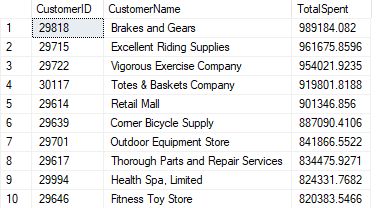
It has made a reasonable assumption about what “top customers” means, interpreting it as customers who have spent the most overall. It has also inferred that a customer is either an individual from Sales.vIndividualCustomer or a store.
That’s not a bad first attempt, but whether it’s what you wanted depends entirely on the context. At this point, there are at least two unanswered questions: how a customer should be defined, and what top is really intended to measure.
Improve system context – how is a customer defined?
In this example, SQL Prompt AI has chosen to use a view as the source of customer data. That’s a reasonable choice, but the LLM model is non-deterministic and with the same prompt might just as easily generate a query that joins the base table (Person.Person).
The view is filtered, so some individuals (such as those with no address) don’t appear, and the query falls back to store names. Using the base table would return person names instead. Both approaches are valid, but they produce different results.
When there’s more than one valid way to interpret which data to use, you need to be explicit about operational constraints, such as whether the query should use base tables or views. This is especially important because the model’s first response becomes part of the prior context for any follow-up prompts. Each iteration builds on the shape of the SQL that already exists in the query window. If that initial definition of customer is wrong, it can set you off on the wrong trajectory and waste a lot of time.
Strengthen the task definition – what is a “top” customer?
Even having specified more clearly how a customer is defined, “top customer” is still ambiguous. Do we mean the highest total spend overall, or the highest annual or monthly spend? Is a simple ranked list sufficient, or do we want to analyze top customers by year and by sales region?
Depending on the exact wording of the prompt and the shape of the starting query, a follow-up request such as “Show me the top 5 customers by year and by sales region” can be interpreted in different ways. It might produce a simple filtered view (for a single year or region), or a full ranked breakdown showing the top N customers per year and per region.
When the task and expected result are clearly defined up front, you’re far more likely to get something usable straight away, with only a few small refinements needed afterwards. For example, the prompt…
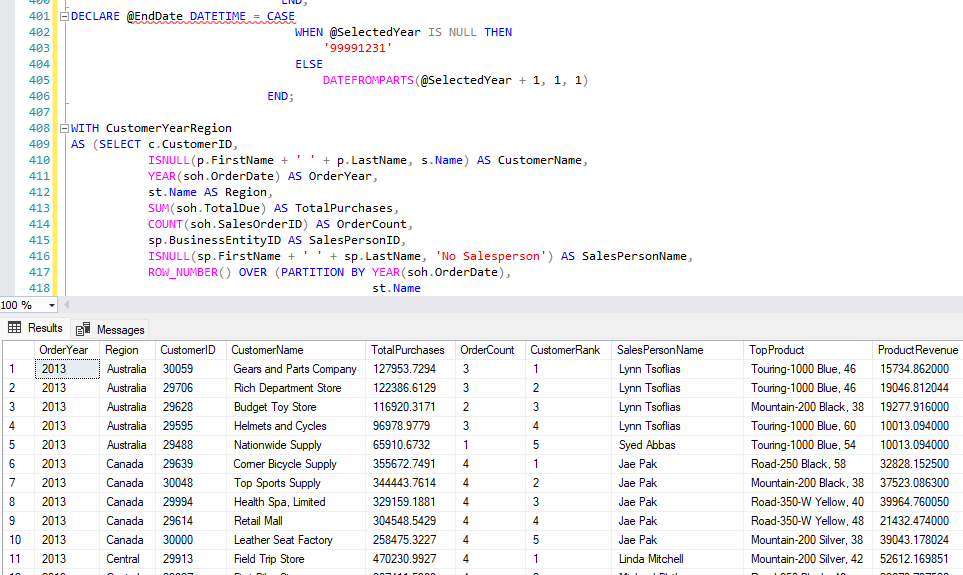
“Build a sales report that displays the Top 5 customers, ranked by total spend per year and region, with optional year and region filters. Include the number of orders, the salesperson associated with each customer, and the product that generated the most revenue.”
…gave a report that looks like this:
Feed AI an example of what you need
As developers, we often need to write SQL that closely resembles something we’ve already done. One of the quickest ways to get useful results from SQL Prompt AI is to give it a concrete example of the kind of query you’re aiming for. If you can provide a single example of a “top customers” report, perhaps from another database or application, the AI has a much clearer reference point to work from.
There are two main ways to do this.
- Via the query window – SQL Prompt AI is aware of any SQL already in the editor, so you can paste in a reference query, place the cursor after it, and ask the AI to analyze or extend the code above. You can also use inline comments to make it explicit that the SQL should be treated as an example.
- Via the prompt itself – the prompt input allows multiple lines (shift-enter), making it easy to paste in example code alongside your instructions when that feels more convenient.
Querying imperfect databases: providing additional schema context
SQL Prompt AI can use your query and database schema as context, but it doesn’t have access to the underlying data. This means that it can’t always infer the meaning of a schema when naming is inconsistent, or relationships aren’t obvious. In real-world databases, that’s common: important joins exist, but they’re buried behind bridge tables, or obscured by abstract naming.
For example, imagine a schema like this, where usage events are recorded against a ProductID, but product names are only available via a non-obvious mapping to a central catalog:
|
1 2 3 4 5 6 7 8 9 10 11 12 13 14 15 16 17 18 19 20 21 22 23 24 25 |
CREATE TABLE dbo.UsageEvent ( UsageEventId INT IDENTITY(1, 1) PRIMARY KEY, ReceivedTimeUTC DATETIME2(0) NOT NULL, EventType VARCHAR(50) NOT NULL, ProductId INT NOT NULL ); -- Product classification used by reporting CREATE TABLE dbo.ProductClass ( ProductId INT NOT NULL PRIMARY KEY, ProductClass VARCHAR(40) NOT NULL ); -- Central catalog (separate system) CREATE TABLE dbo.CatalogItem ( CatalogId INT NOT NULL PRIMARY KEY, DisplayValue VARCHAR(200) NOT NULL ); -- Non-obvious bridge between systems CREATE TABLE dbo.ProductCatalogMap ( ProductId INT NOT NULL PRIMARY KEY, CatalogId INT NOT NULL ); |
If you ask SQL Prompt AI to show the top usage events from the last 14 days, grouped by product, it may reasonably group by ProductClass, because that’s the most obvious “product-like” value it can see:
|
1 2 3 4 5 6 7 8 9 10 11 12 |
-- Query for top usage events from the last 14 days, grouped by product SELECT pc.ProductClass, ue.EventType, COUNT(ue.UsageEventId) AS EventCount, MAX(ue.ReceivedTimeUTC) AS MostRecentEvent FROM dbo.UsageEvent ue JOIN dbo.ProductClass pc ON ue.ProductId = pc.ProductId GROUP BY pc.ProductClass, ue.EventType ORDER BY pc.ProductClass, COUNT(ue.UsageEventId) DESC; |
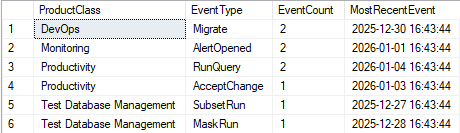
In this schema, however, the product names are resolved through dbo.ProductCatalogMap and dbo.CatalogItem. If you call that out in the prompt (or as an inline comment), the AI has what it needs to produce the query you intended. For example:
“Resolve product names via ProductCatalogMap and CatalogItem.DisplayValue“
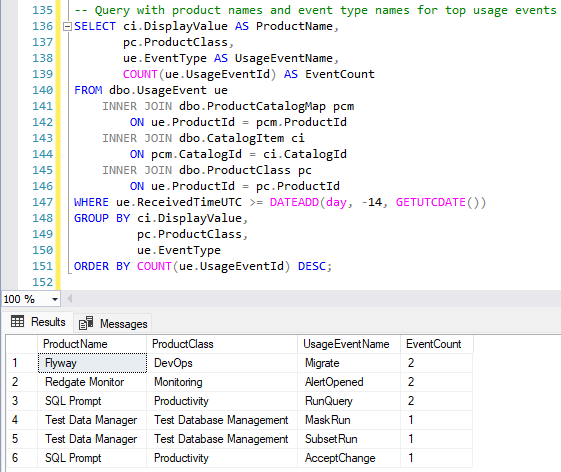
When the correct join path isn’t obvious from names and relationships alone, a simple pointer can save a lot of trial and error.
Conclusions
Getting useful results from SQL Prompt AI doesn’t require writing the perfect prompt but it does require you to be clear about what you want and what the constraints are. It already understands your schema and your SQL environment, but it will not know what you really mean by “better”, “top”, or “faster” unless you tell it.
Vague prompts force the AI to guess. Those guesses are often reasonable, but wrong, especially when there’s more than one valid way to interpret what data should be used. A little extra clarity up front about the task, the constraints, and any ‘schema design quirks’ usually saves far more time than it costs.
Used well, SQL Prompt AI will be a fast, reliable assistant when writing or improving SQL code. Make your prompts explicit about what you need, always review the output carefully, and treat the results as a starting point, not the final answer.
Feedback
We’d welcome your feedback on these new SQL Prompt AI features. You can share it using the in-product feedback button or by emailing us at sqlprompt-feedback@red-gate.com.
If you already have a subscription or supported license for SQL Prompt, SQL Toolbelt Essentials, or SQL Toolbelt, you can download the latest version and try it out. Otherwise, you can purchase a license online.
Useful background reading materials
- How Large Language Models work
- The Ultimate Guide to CRISPE
- The ultimate guide to writing effective AI prompts
Tools in this post
You may also like
-

Article
The Louis Davidson custom style for SQL Prompt
Louis Davidson sticks his neck out and offers his take on a sensible SQL code formatting style, based on twenty-plus years of writing SQL. Starting from SQL Prompt's Default style, he customizes it based on his own list of personal preferences for how SQL code should look. The result is the Louis Davidson custom SQL Prompt style that you can download, try out, and adapt as required.
-

Article
Inside Perspectives: What does AI mean for Redgate?
Jeff Foster, Director of Technology & Innovation at Redgate, explains how Redgate is approaching the AI revolution.
-
Article
How to use the SQL Prompt snippet placeholders for selecting and copying text
Phil Factor demonstrates the power of placeholders in SQL Prompt Snippets, for selecting and copying text. They make it very easy to build queries by dragging-and-dropping from the SSMS object explorer, and also to save queries as reusable views or inline table valued functions.
-
Article
How we used your feedback to improve parentheses formatting in SQL Prompt 8.1
After we released SQL Prompt 8, our priority was to continue to support the new formatting engine by fixing any bugs and reviewing feedback from users. One of the recurring patterns we noticed in your feedback regarded parentheses formatting. Some of you told us you couldn’t format the parentheses exactly the way you wanted to.
-
Article
Finding Correlated Rows Using EXISTS or COUNT
Should you always use
EXISTSrather thanCOUNTwhen checking for the existence of any correlating rows that match your criteria? Does the former really offer "superior performance and readability". Louis Davidson investigates.


