Troubleshooting and fixing a .NET application that accesses a database

The problem

A .NET application running on Red Gate Software's new intranet system was not giving the same result as the old version.

Had it always been wrong? Had someone rewritten the stored procedure? Was the input data corrupted? These and various other scenarios were all possible.

The background

Red Gate uses a Microsoft SQL Server database as the repository of company data. Data is accessed by a range of purchased and home-grown applications.

Recently, Red Gate began rewriting intranet applications in .NET to clean up code and allow the company to do more with the data. Among other things, these intranet applications generate price quotes and provide information on business indicators such as company earnings, and who is trying out the latest versions of software.

One useful function determines customer locations by telephone number. This is used to make sure that the right person is responsible for a given customer and to aggregate monthly statistics that show how different sales people are performing. It's important that the numbers are correct, since sales people are paid according to these calculations.

There was a big discrepancy in sales territory data between the old and new versions – the problem had to be identified, so a previous mistake could be resolved or a new one corrected, before chaos was introduced into the sales process.

Both Red Gate's new .NET application and its old COM application rely on a user-defined function in the customer database that calculates the state, based on the area code and a lookup table.

Identifying the problem

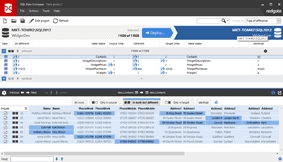
Red Gate's live database server has the old database on it. The development database will be used for the new .NET-written intranet. The first step was to run the user-defined function on both databases, as shown in the screenshot below:

Comparison of the user-defined function

Figure 1. Before and after comparison of running the same user-defined function on the database. The live database is called "shopping," the live server is named "orange," the development database is "RedGateNew," and the development server is running on a virtual PC partitioned with VMware. The two user-defined functions show different results, indicating a problem.

The input of the telephone number in the development database returned a null result, while the live database correctly identified a California telephone number. It was clear that something had happened to the user-defined function or the lookup table in the development database.

Troubleshooting the user-defined function

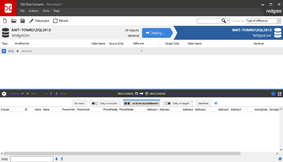
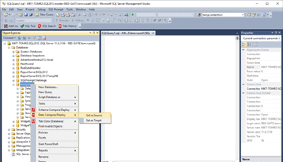
Red Gate used its SQL Compare software to compare the user-defined function on the development and live databases. SQL Compare can compare any or all database objects. The user-defined function that needed to be investigated was "fnGetStatefromPhoneNumber," shown in the comparison below:

User-defined functions are identical

Figure 2. Details from comparing the "fnGetStatefromPhoneNumber" user-defined function show identical results for both the development and live databases.

As seen above from the comparison overview and the details, the two user-defined functions are identical. That shows the problem was not because of a change in the user-defined function.

Troubleshooting the lookup table

If the problem wasn't with the user-defined function, Red Gate figured it was with the lookup table. This was investigated using SQL Data Compare, Red Gate's software for comparing database contents.

The lookup table is kept in a table called "USAreaCodes"; the SQL Data Compare results for this table are shown below:

Compare contents of development and live databases

Figure 3. Comparison of the contents of the USAreaCodes table between the development and live databases. There are 362 records missing from the development database.

Bingo! The data in USAreaCodes was deleted in the development database. Red Gate had identified why and, more importantly, how the application was failing.

Fixing the problem

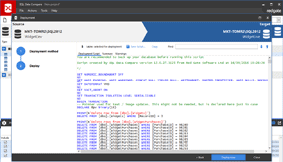
To fix the problem, Red Gate synchronized the USAreaCodes table on the development database with the data from the live database. This was done using SQL Data Compare, which generated the script and ran it in about 10 seconds.

The problem was identified, diagnosed and solved in five minutes using Red Gate's SQL Compare and SQL Data Compare for comparing SQL servers. In this case, the problem was caused by a developer accidentally deleting the USAreaCodes table in the development database, and forgetting to replace the data.

Pricing
from $395
SQL Data Compare is available in Pro and Standard versions, or as part of a bundle.

Volume discounts apply.

Got a question?
0800 169 7433
Download

Try a 14-day fully functional free trial of SQL Data Compare.

SQL Developer Bundle

With our full set of SQL development tools you can code fast, collaborate easily, and deploy accurately. Sound good?

Find out more...

Data compare for Oracle?
Works just like SQL Data Compare, but for Oracle databases.

Data Compare for Oracle