Security and compliance
Ensure data security and compliance with data masking, monitoring, and change traceability
Ensure data security and compliance with data masking, monitoring, and change traceability
Monitor and understand your databases with full visibility into performance and change
Build, test, and deploy database changes with confidence
Simplify and speed up database development workflows
Prepare reliable data foundations for AI initiatives
Simplify and secure database modernization across platforms
Control costs and boost efficiency in database operations
Simplify and speed up cloud database transformation
A workflow-led solution for SQL Server development teams, covering database design, AI-assisted coding, version control, testing, and safe deployment. Everything your team needs to deliver faster, with less risk.
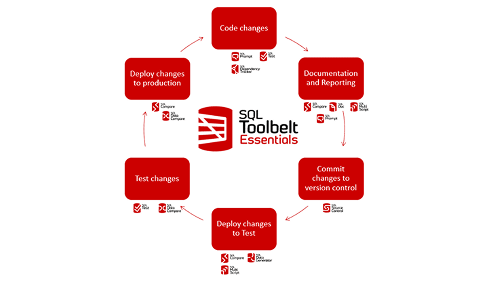
SQL Toolbelt Essentials is an AI-augmented, workflow-led solution for SQL Server database teams, covering schema design, coding, version control, testing, and deployment. One solution. Every stage of database development.
Works with SQL Server on-premises and in the cloud. No complex setup, and your team can start seeing results from day one.
What’s more, it’s easy to get started and see impact quickly, for less than the price of a daily coffee per user*.
Download free trial1 Year Subscription
Considering a longer-term contract?
Ask us about available discounts on SQL Toolbelt Essentials
When every developer works differently, inconsistency compounds: mismatched code styles, environment drift, review bottlenecks. SQL Toolbelt Essentials gives your team a shared workflow, from design to deployment.

Issues caught late cost more, in time, reputation, and recovery effort. SQL Toolbelt Essentials builds risk reduction into the workflow: test before deployment, compare schemas across environments, deploy with dependency-aware scripts. Problems get caught by the developer who introduced them, not escalated later.

Every database change is versioned and auditable, as a byproduct of how your team works, not a separate exercise. Meet compliance requirements without manual logging, diagnose incidents faster, and protect institutional knowledge as your team evolves.


Write better SQL, faster. AI that understands your schema completes multi-line queries, catches issues, and fixes them, without leaving SSMS. Less time on formatting and debugging. More time on the work that matters.

One standardized way of working, from design to deployment. Fewer review cycles, less rework, and releases that are predictable. Any developer can contribute database changes safely, not just your most trusted few.

Less downtime. Faster delivery. Lower risk. Every database change is auditable as a byproduct of how your team works, meeting compliance requirements without manual overhead. One investment, measurable outcomes.
No complex setup. Your team works in SSMS today, SQL Toolbelt Essentials fits straight in. Start seeing results from day one.
SQL Toolbelt Essentials includes 11 tools covering every stage of SQL Server development. No complex setup, your team can start seeing results from day one.
No complex setup. Your team works in SSMS today, SQL Toolbelt Essentials fits straight in. Start seeing results from day one.
Whether you want more details about SQL Toolbelt Essentials, a demo or information on best practices – get in touch with us.

Redgate has specialized in database software for over 25 years. Our products are used by 92% of the Fortune 100. 200,000 customers rely on Redgate worldwide.
Redgate offers comprehensive documentation and a friendly, helpful support team. An average 87% of customers rate our support 'Excellent'.
*SQL Toolbelt Essentials costs $4.88 per user, per working day when 10 licenses are purchased.
The cost of a short flat white in Starbucks is $6.37 (as of 27.10.2025).